BASF Case Study
Implemented QES and Mobile ID e-signatures
- Moved 92% of document workflow to digital format.
- 100% of documents are legally valid.
- The number of errors in reports decreased 7-fold.
- Implementation period – 8 months.
About the Client
BASF is a global leader in chemical production and a Fortune 500 company. The company employs more than 110,000 people across different regions worldwide.
BASF’s product portfolio includes industrial solutions, chemicals, materials, surfactants and technologies, as well as solutions for nutrition, care and agriculture.
When a company has tens of thousands of employees in different regions worldwide, document workflow becomes a critical part of operations – that is why BASF decided to switch to a digital format


“When we simply counted the number of documents we generate every year – tens of thousands of them – there was no question about what to do next.”
Denys Koptelov
BASF
Project Objectives
The main goal was to optimize document workflow business processes and move to a paperless office format.
A key project component was to implement document signing in Directum RX using an electronic signature with legal force in Ukraine.
Implementation Approach
Defined EDMS requirements
At the start, we defined EDMS criteria so the system would cover both legal requirements and daily document-related tasks.1
Qualified electronic signature (QES).
2
Mobile ID support.
3
Convenient storage, processing and quick document search.
4
Flexible document routing and execution control.
5
Working with document templates.
6
Information security + integration capabilities (API).

Moved documents to digital format
At the first stage, we digitized accounting and HR documents, as well as contracts. It was important to preserve the legal force of signed documents, so we immediately planned the development of a solution for signing documents with a qualified electronic signature (QES).
Developed a document signing mechanism
We configured work with electronic signature certificates issued by Ukrainian accredited key certification centers. Certificates can be stored on a local PC drive, USB flash drive, USB token or smart card.
During implementation, it was important to integrate the solution into the Directum RX software environment so that it worked naturally inside the system.
In addition, users gained the ability to sign documents via the Mobile ID SIM card of the Vodafone mobile operator.
How signing via Mobile ID works
The system generates a hash of the document data and sends a request to the mobile operator through a web service. The user receives a confirmation request on their phone and enters a password. After confirmation, the signature is returned through the web service to Directum RX and automatically linked to the document.
Signature validity is additionally checked through the certification centers’ OCSP servers, and the verification result is displayed in the Directum RX interface.
This mechanism provides legal force, security and convenient document signing directly in the system interface.

Implemented PDF generation with an e-signature mark
When generating a PDF document, the system can add a stamp with signature information. This simplifies signature verification, speeds up document exchange and increases trust when exchanging documents with counterparties.
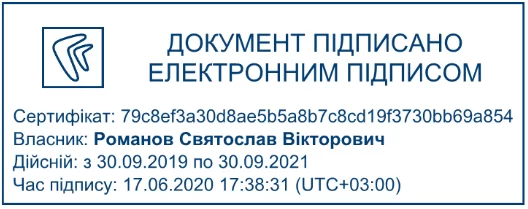
When signing with an e-signature certificate, the stamp includes information about the certificate, its owner, validity period and signing time.
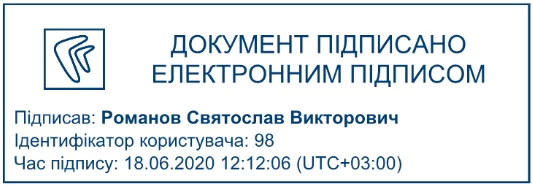
When signing with a simple e-signature, the stamp shows the full name of the employee who signed the document, their system ID and signing time.
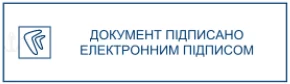
The small stamp contains a brief note: "Document signed with an electronic signature."
Configured export of documents with e-signatures
As part of the project, we added the ability to export documents together with signatures for submission to inspection authorities. Exported files can be verified on an external resource.
The system exports the latest signed versions of documents that meet the selection criteria to a folder chosen by the user.
Document export parameters
Document selection by criteria:
- our organization;
- counterparty;
- document type;
- period (date from – date to).
Selecting documents from a folder in the system.
Allows signed documents to be quickly exported from the required section without manual selection.
Signature type for export:
- approved;
- agreed;
- not agreed.
Export grouping:
- do not group;
- by counterparties;
- by document types.
Depending on the selected grouping method, the system creates a folder structure for export
Do not group
A separate subfolder is created for each exported document
By counterparties
A separate subfolder is created for each counterparty, and documents are stored in a folder named after the relevant counterparty.
By document type
Folders are created with document type names, and exported files are placed in the corresponding subfolders.
This approach simplifies preparation for inspections, saves time and reduces the risk of errors during document exchange.
Implementation Results
We implemented a convenient document signing mechanism using e-signatures, which accelerated approvals and exchange with counterparties. The web service was enhanced to ensure stable operation through a proxy with the mobile operator. As a result, employees spend less time on documents and more time working with clients and partners.
Client Feedback
“The main priorities for BASF were the specifics of our internal document workflow and the ability to adapt the solution to the company as much as possible. Following a tender, we selected LITIKO to implement the project because it had the required competencies and experience.
As a result, the speed of working with documents, creating them and delivering them has increased. The project became an important step in BASF’s digitalization journey. We already have ideas for further development.
Therefore, in the near future, the next thing we want to implement is viewing and signing documents in a mobile app.”
Denys Koptelov
IT Manager BASF Ukraine